
这个模块比较短,把前三个模块学过的东西,接到实际开发时会用到的工具上。
This module is shorter. It connects what the first three modules covered to the tools you actually use when developing.
4.1 版本控制:Git 与 GitHub4.1 Version control: Git and GitHub
Git 是一套记录代码每次改动的工具。每次你觉得"这个阶段可以了",就做一次提交(commit),Git 会把当下的状态存成一个快照。之后不管改坏了什么,都能退回任何一个历史快照,不用自己想办法复原。
几个基本概念:
- 仓库(repository):一个被 Git 追踪的项目文件夹
- 提交(commit):一次存档,记录了改了哪些档案、改了什么内容
- 分支(branch):可以在不影响主线代码的情况下,开一条独立的线开发新功能,确定没问题了再合并回主线
GitHub 是把 Git 仓库放到网络上的平台,方便团队协作、备份、审查彼此的代码。日常最基本的流程:
Git is a tool that records every change to your code. Whenever you feel "this stage is good", you make a commit, and Git saves the current state as a snapshot. However badly you break things later, you can roll back to any past snapshot, without having to undo it by hand.
A few basic ideas:
- Repository: a project folder tracked by Git.
- Commit: one saved point, recording which files changed and what changed in them.
- Branch: you open a separate line to build a new feature without affecting the main code, then merge it back once you are sure it is fine.
GitHub is a platform that puts a Git repository online, making it easy to collaborate, back up, and review each other's code. The most basic daily flow:
git add .
git commit -m "加入购物车结账功能"
git push
git add . 把改动过的档案标记成"准备存档",git commit 正式存一次档并写上说明,git push 把这次存档送上 GitHub。
这套工具对"跟 AI 协作写代码"特别重要:AI 帮你改了一段代码,结果改坏了,只要你有养成常常 commit 的习惯,直接退回上一个版本就好,不用自己一行一行想办法复原。
git add . marks the changed files as "ready to save", git commit saves a point with a message, and git push sends that saved point up to GitHub.
This matters especially when you build with AI: if AI changes some code and breaks it, as long as you are in the habit of committing often, you just roll back to the previous version, instead of undoing it line by line.
4.2 打包与部署:从你的电脑到网络上4.2 Build and deploy: from your computer to the web
你写代码时用的版本,通常可读性高、方便除错,但体积大、跑起来不是最快的。真正给使用者用的版本,需要经过一个打包(build)的过程,把代码压缩、整理成体积小、执行效率高的版本。
打包完的东西要放到网络上,让别人连得到,这靠部署平台:
- Vercel:特别适合前端项目,设定简单,跟 GitHub 连动,push 代码后自动部署
- AWS:功能最完整,几乎什么都能做,但设定也最复杂,比较适合大型或有特殊需求的项目
- Cloudflare:主打便宜、速度快,也有类似 Vercel 的简易部署功能
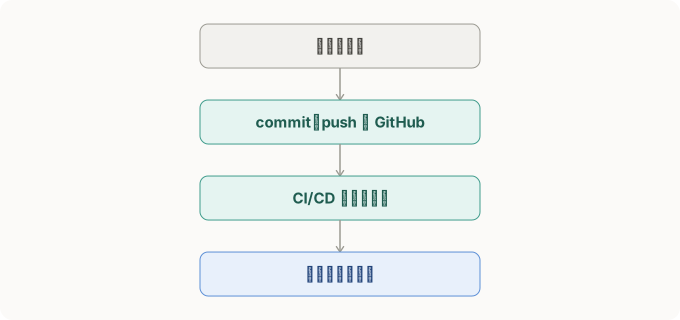
现代开发流程通常会接上 CI/CD(持续整合/持续部署):代码一 push 到 GitHub,自动跑一次测试,测试通过才自动部署到线上,不用手动打包、手动上传档案。上面那张图画的就是这个流程。
The version you write is usually readable and easy to debug, but large and not the fastest to run. The version users actually get goes through a build process that compresses and tidies the code into something small and efficient.
The built result has to go online so others can reach it, and that is what a deploy platform does:
- Vercel: especially good for frontend projects, simple to set up, linked to GitHub, and it deploys automatically after you push.
- AWS: the most complete, able to do almost anything, but also the most complex to set up, better for large projects or special needs.
- Cloudflare: known for being cheap and fast, and it also has simple Vercel-like deployment.
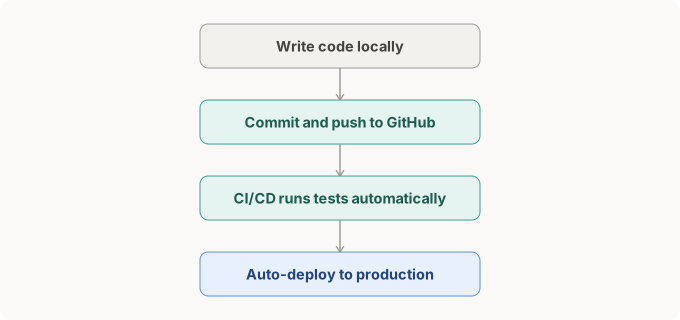
A modern workflow usually adds CI/CD (continuous integration and continuous deployment): the moment code is pushed to GitHub, tests run automatically, and only if they pass does it deploy to production, with no manual building or uploading. The diagram above shows this flow.
4.3 环境变量与多环境设定4.3 Environment variables and multiple environments
Module 1.5 提过一次,密钥这类敏感资料要放进环境变量,不能写死在代码里。这里把这个概念延伸一下。
实际开发时,通常会有好几套环境:
- development:自己电脑上开发用的环境,资料通常是假资料
- staging:团队内部测试用,尽量模拟正式环境
- production:真正给使用者用的正式环境
每套环境用的密钥、数据库位置都不一样,靠环境变量切换,代码本身不用改。环境变量通常写在一个叫 .env 的档案里:
Module 1.5 mentioned once that sensitive data like keys should go in environment variables, not hard-coded. Here we extend that idea.
In real development there are usually several environments:
- development: the environment on your own computer, usually with fake data.
- staging: for the team's internal testing, made to mimic production as closely as possible.
- production: the real environment that users actually use.
Each environment uses different keys and database locations, switched by environment variables, without changing the code itself. Environment variables usually live in a file called .env:
DATABASE_URL=postgres://localhost:5432/mydb
API_KEY=sk-live-8f3a2b9c1234567890abcdef
这个档案存着敏感资料,绝对不能被 Git 追踪、更不能被推上 GitHub,要写进 .gitignore 这个档案里,告诉 Git"这些东西不要管"。
AI 帮你的项目生成了这份 .gitignore:
node_modules/
dist/
*.log
给自己 1 分钟,对照 4.3 讲的内容,想想这份清单漏了什么,再往下看答案。
看答案
答案:漏了 .env。
node_modules/(下载下来的第三方套件)、dist/(打包后的产物)、*.log(记录档)不该被 Git 追踪,这没问题。但 .env 也没被排除,代表这个存着数据库密码、API 金钥的档案,会被正常 commit、正常 push 上 GitHub。
如果这个仓库是公开的,所有密钥当场外泄。就算仓库是私人的,只要有协作者的权限管理出过一次疏忽,或者之后仓库不小心被设成公开,密钥一样会曝光。
正确的 .gitignore 要加上:
node_modules/
dist/
*.log
.env
审查 AI 生成的项目设定档时,.gitignore 有没有排除 .env,是很容易漏掉、但后果很严重的一个检查点。
This file holds sensitive data, so it must never be tracked by Git, let alone pushed to GitHub. You add it to a file called .gitignore to tell Git "leave these alone".
AI generated this .gitignore for your project:
node_modules/
dist/
*.log
Give yourself 1 minute. Against what 4.3 covered, think about what this list is missing, then read the answer.
看答案
Answer: it is missing .env.
node_modules/ (downloaded third-party packages), dist/ (the build output), and *.log (log files) should not be tracked by Git, which is fine. But .env is not excluded, which means this file holding the database password and API keys gets committed and pushed to GitHub like anything else.
If the repository is public, every key leaks on the spot. Even if it is private, one slip in a collaborator's permissions, or the repo being made public by accident later, exposes the keys just the same.
The correct .gitignore adds:
node_modules/
dist/
*.log
.env
When you review AI-generated project config, whether .gitignore excludes .env is an easy-to-miss check with serious consequences.
延伸资源
- GitHub Docs: Git basics — 对应 4.1,官方的 Git 入门指南— for 4.1, the official Git getting-started guide
- GitHub Docs: Storing your secrets safely — 对应 4.3,密钥管理的完整说明— for 4.3, the full guide to managing secrets