
这是整门课的第一个模块。学完这三节,你会有一个完整的心智模型:软件系统由哪几层组成、AI 进来之后工程师的工作变成了什么样、以及接下来你要刻意练习哪几个技能。
This is the first module of the course. After these sections you will have a full mental model: what layers a software system is built from, how an engineer's job changes once AI is in the picture, and which skills you should practice on purpose from here on.
1.1 这场变化到底是什么1.1 What exactly is changing
以前想做一个"待办事项清单"功能,你得自己写增删改查的代码,查资料、除错,弄个几小时才能跑起来。
现在,你可以叫 AI 直接生成一份能跑的代码,可能几分钟就有了。
但 AI 生成的东西不一定是对的。它可能漏掉"清单是空的"这种边界情况,也可能用了过时的写法,或者根本理解错你的需求。跑得动,不等于对。
这就是变化的核心:
- 旧世界,工程师的价值很大一部分来自打字速度、记住多少语法、手动写出每一行逻辑。
- 新世界,这些基本不重要了。AI 打字比你快得多,语法它也记得比你熟。
真正拉开差距的,变成两件事:你能不能把一个模糊的想法拆成 AI 能执行的清楚步骤,以及 AI 做完之后,你能不能看出它哪里做错了。
这两件事,就是接下来整门课在教的东西。
In the past, building a simple to-do list feature meant writing all the create, read, update and delete code yourself, looking things up and fixing errors, a few hours before it even ran.
Now you can ask AI to generate working code directly, and you might have it in a few minutes.
But what AI generates is not always correct. It can miss an edge case like "the list is empty", use an outdated approach, or simply misread what you asked for. Running is not the same as correct.
This is the heart of the change:
- In the old world, a lot of an engineer's value came from typing speed, how much syntax they remembered, and writing out every line of logic by hand.
- In the new world, those barely matter. AI types far faster than you, and it remembers syntax better than you do.
What really sets people apart becomes two things: whether you can break a fuzzy idea into clear steps AI can carry out, and whether you can spot where AI went wrong once it is done.
These two things are what the rest of this course teaches.
1.2 现代软件系统的三层:前端、后端、基础设施1.2 The three layers of a modern system: frontend, backend, infrastructure
用一个具体例子讲这个:一个线上点餐 App。
用户打开 App,看到菜单,选了一份炒饭加一杯奶茶,按下"送出订单"。这个动作背后,系统分成三层在工作:
- 前端:用户实际看到、点击的部分。菜单怎么显示、购物车长什么样、"送出订单"这个按钮,都是前端。
- 后端:处理逻辑和数据的部分。订单送出后,系统要检查库存够不够、算总价、把订单写进数据库、通知厨房,这些都是后端在做。
- 基础设施:让前面两层能真正运作起来的部分。App 部署在哪台服务器、同时有几千人下单时系统扛不扛得住、金流串接的密钥怎么安全存放,这些是基础设施在负责。
请求的完整流程是这样:
用户按下"送出订单" → 前端把订单资料送到后端 → 后端检查库存、算价格、写入数据库 → 后端回一个"订单成立"的讯息 → 前端把这个讯息显示给用户看。
下面这张图会把这个流程画出来。
之后 Module 2 讲前端,Module 3 讲后端,Module 4 讲基础设施常用的工具组合,会把这三层各自拆开、讲得更细。现在你只需要记住这三层各自负责什么,以及请求是怎么在它们之间流动的。
Let's use a concrete example: an online food-ordering app.
A user opens the app, sees the menu, picks a plate of fried rice and a milk tea, and taps "Place order". Behind that action, the system works in three layers:
- Frontend: the part users actually see and tap. How the menu shows, what the cart looks like, the "Place order" button, all of that is frontend.
- Backend: the part that handles logic and data. Once the order is sent, the system checks whether stock is enough, works out the total, writes the order into the database, and notifies the kitchen. That is all backend.
- Infrastructure: the part that lets the first two layers actually run. Which server the app sits on, whether the system holds up when thousands order at once, how the keys for the payment integration are stored safely, that is infrastructure's job.
The full flow of a request looks like this:
The user taps "Place order" → the frontend sends the order data to the backend → the backend checks stock, works out the price, writes to the database → the backend returns an "order confirmed" message → the frontend shows that message to the user.
The diagram below draws out this flow.
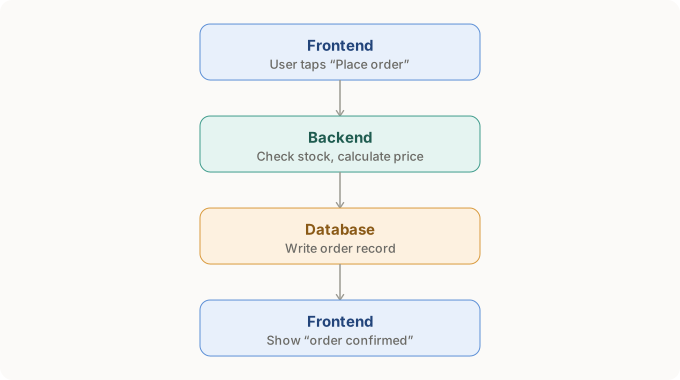
Later, Module 2 covers the frontend, Module 3 the backend, and Module 4 the common tool stack for infrastructure, breaking each layer down in more detail. For now, you only need to remember what each layer is responsible for, and how a request flows between them.
1.3 你要练的三个技能:拆需求、审代码、抓 bug1.3 Three skills to practice: break down, review, debug
跟 AI 协作开发,你同时在演三个角色。
需求拆解者
把模糊的需求拆成小步骤,AI 出错的空间会小很多。举例,要做一个登入功能,可以拆成:
- 先建用户资料表
- 做密码加密逻辑
- 做登入用的 API
- 最后接前端的登入表单
拆成四步之后,如果哪一步跑出来的结果不对,你能很快知道问题出在哪一步,而不是面对一整包代码不知从何查起。
审查者
AI 给你代码后,你要能说出"这段在做什么"。跑得动不等于对。
除错者
出错时,你要能把问题范围缩小。比如是数据根本没抓到,还是抓到了但格式不对。范围缩得越小,越快找到真正的原因。
When you build with AI, you play three roles at once.
The requirement breaker
Break a fuzzy requirement into small steps and AI has far less room to go wrong. For example, a login feature can be split into:
- First build the user table
- Then the password hashing logic
- Then the login API
- Finally connect the frontend login form
With four steps, if one step gives a wrong result you can quickly tell which step it is, instead of facing one big lump of code with no idea where to start.
The reviewer
After AI gives you code, you should be able to say what it does. Running is not the same as correct.
The debugger
When something breaks, you should be able to narrow the problem down. For example, was the data never fetched, or fetched but in the wrong format. The smaller the range, the faster you find the real cause.
这是一段 AI 生成的 JavaScript 函式,用来计算购物车总价:
Here is an AI-generated JavaScript function that adds up a cart total:
function getTotal(cart) {
  let total = 0;
  for (let i = 0; i <= cart.length; i++) {
    total += cart[i].price;
  }
  return total;
}
给自己 2 分钟,想清楚这段代码执行到最后一步会发生什么,再往下看答案。
Give yourself 2 minutes to work out what happens on the last step of this loop, then read the answer.
看答案
答案:问题出在 i <= cart.length。
假设购物车里有 3 件商品,编号是 0、1、2。这段代码却想多读一次编号 3 的商品,但编号 3 根本不存在,会读到空值,程序会报错,或者算出错误的总价。
正确写法是 i < cart.length。
这种"多读一格"的错误叫 off-by-one error,是 AI 生成代码里最常见的问题之一。你不需要会写这段代码,但看得懂"为什么多读一次会出错",就已经具备审查者的基本功了。
Answer: the problem is i <= cart.length.
Say the cart has 3 items, indexed 0, 1 and 2. This code tries to read one more, index 3, but index 3 does not exist. It reads an empty value, and the program either errors out or adds up a wrong total.
The correct version is i < cart.length.
This "one step too far" mistake is called an off-by-one error, one of the most common problems in AI-generated code. You do not need to be able to write this code, but understanding why reading one extra step breaks it already gives you the reviewer's basic skill.
1.4 实际会用到的东西叫什么名字1.4 What the things you'll use are actually called
前面讲前端、后端、基础设施,都还是抽象说法。这里把每一层实际会用到的工具和语言名字列出来,先混个脸熟,之后每个名字出现时,你才不会觉得陌生。
前端
- HTML:网页的骨架,决定页面上有什么,标题、按钮、图片这些元素
- CSS:网页的皮肤,决定这些元素长什么样,颜色、大小、排版
- JavaScript:网页的肌肉,让页面会动、会反应,按钮按下去会发生什么事
- React、Vue 这类框架:网页做大了之后,方便把元素拆成可以重复使用的零件
后端
- 常见语言:Python、JavaScript(在服务器端跑叫 Node.js)、Java、Go
- 框架:帮你少写重复代码的工具,比如 Python 的 Django、Flask,Node.js 的 Express
- API:前端跟后端之间说话的方式,最常见的形式叫 REST
- 数据库分两大类:关系型(PostgreSQL、MySQL,像 Excel 表格,资料之间有明确关联)、非关系型(MongoDB、Redis,存法比较自由,适合结构常变动的资料)
基础设施
- Git / GitHub:记录代码每一次改动,改坏了可以退回去
- Docker:把整个程序打包成一个盒子,在任何机器上都能用同样方式跑起来
- 部署平台:Vercel、AWS、Cloudflare 这些,负责把程序放到网络上让别人用得到
- 环境变量:把密钥、密码这类敏感资料跟代码本身分开存放,不写死在代码里
你现在不需要会用这些东西,Module 2 到 4 会一个一个拆开讲。
Frontend, backend and infrastructure are still abstract words so far. Here are the names of the tools and languages each layer actually uses. Get familiar with them now, so that when each name shows up later it does not feel strange.
Frontend
- HTML: the skeleton of a page. It decides what is on the page, elements like headings, buttons and images.
- CSS: the skin of a page. It decides how those elements look, their color, size and layout.
- JavaScript: the muscle of a page. It makes the page move and respond, deciding what happens when a button is pressed.
- Frameworks like React and Vue: once a page grows large, they make it easy to split elements into reusable parts.
Backend
- Common languages: Python, JavaScript (called Node.js when it runs on the server), Java, Go.
- Frameworks: tools that save you from writing repetitive code, such as Django and Flask for Python, or Express for Node.js.
- API: the way the frontend and backend talk to each other. The most common form is called REST.
- Databases come in two broad types: relational (PostgreSQL, MySQL, like Excel tables with clear links between data) and non-relational (MongoDB, Redis, stored more freely, good for data whose shape changes often).
Infrastructure
- Git / GitHub: records every change to the code, so you can roll back if you break something.
- Docker: packs the whole program into a box so it runs the same way on any machine.
- Deploy platforms: Vercel, AWS, Cloudflare and the like, which put the program on the network so other people can use it.
- Environment variables: keep sensitive data like keys and passwords separate from the code, instead of hard-coding them.
You do not need to use these yet. Modules 2 to 4 unpack them one by one.
1.5 三轮完整案例:从需求到抓错1.5 Three full walk-throughs: from request to catching the error
不只一个函式,拿三个不同层面的例子,走一遍完整流程:你怎么下需求 → AI 给出什么 → 你怎么审查 → 抓到什么问题。
案例一:前端
你说:"做一个按钮,点了之后把购物车的商品数量加一,并且更新画面上显示的总价。"
AI 给你:
Not just one function this time. Take three examples from different layers and walk through the full flow: how you phrase the request, what AI gives back, how you review it, and what problem you catch.
Case one: frontend
You say: "Make a button that, when clicked, adds one to the cart item count and updates the total shown on screen."
AI gives you:
function addItem(cart, item) {
  cart.push(item);
  document.getElementById('total').innerText = calculateTotal(cart);
}
审查:商品加进购物车后,有重新算总价,有更新画面,看起来对。
抓错:如果 calculateTotal 这个函式没被定义,或者定义在别的地方但没被正确引入,这段代码会在浏览器直接报错,画面卡住不动。这是很典型的"局部看起来没问题,但没检查它依赖的东西存不存在"。审查代码不能只看眼前这几行,还要往上追它用到的每一个名字是从哪来的。
案例二:后端
你说:"写一个函式,检查用户输入的 email 格式对不对。"
AI 给你(用 Python):
Review: after the item is added, the total is recalculated and the screen is updated. Looks right.
Catch: if calculateTotal is never defined, or is defined elsewhere but not imported correctly, this code errors out in the browser and the screen freezes. This is a classic case of "the part in front of you looks fine, but you never checked whether the things it depends on exist". Reviewing code is not just reading the few lines in front of you. You also trace where every name it uses comes from.
Case two: backend
You say: "Write a function that checks whether a user's email is in the right format."
AI gives you (in Python):
def is_valid_email(email):
    return "@" in email
审查:能跑,"@" in email 确实能挡掉完全没有 @ 符号的输入。
抓错:这个检查太松了。单独一个 "@" 或者 a@ 都会被判定合法,但这两个都不是有效 email。AI 给你一个"能跑但不够严谨"的答案,是很常见的情况,因为它满足了字面上的需求,却没有真的理解"验证格式"背后要多严谨。
案例三:基础设施 / 资安
你说:"帮我写一段代码,连接到天气 API 拿资料。"
AI 给你:
Review: it runs, and "@" in email does block input with no @ sign at all.
Catch: this check is far too loose. A lone "@" or a@ both pass as valid, yet neither is a real email. AI giving you an answer that runs but is not rigorous is very common, because it met the literal request without really understanding how strict "validate the format" needs to be.
Case three: infrastructure and security
You say: "Write me some code that connects to a weather API and fetches data."
AI gives you:
api_key = "sk-live-8f3a2b9c1234567890abcdef"
response = requests.get(f"https://api.weather.com/data?key={api_key}")
审查:能跑,确实拿得到资料。
抓错:密钥直接写死在代码里。如果这段代码被推上 GitHub 或分享给别人,密钥就外泄了,别人可以拿去盗用,你可能要付一笔意外的账单。正确做法是把密钥放进环境变量,代码里改成 api_key = os.environ["WEATHER_API_KEY"]。
这种"能跑,但藏着资安或成本风险"的问题,在 AI 生成的代码里很常见。2025 年有资安研究机构做过调查,发现这几年 AI 模型生成代码的功能性进步很快,但生成代码的资安水准并没有跟着进步。能不能抓到这类问题,是审查者最值钱的能力之一。
Review: it runs, and it does fetch the data.
Catch: the key is hard-coded straight into the code. If this code is pushed to GitHub or shared with someone, the key leaks, other people can use it, and you may end up with an unexpected bill. The right way is to put the key in an environment variable and change the code to api_key = os.environ["WEATHER_API_KEY"].
This kind of "runs, but hides a security or cost risk" problem is very common in AI-generated code. A 2025 security study found that while AI models improved quickly at making code that works, the security level of that code did not keep pace. Catching this kind of problem is one of the most valuable things a reviewer can do.
延伸资源
- Frontend Developer Roadmap — 对应 1.2 的前端概览— the frontend overview from 1.2
- Backend Developer Roadmap — 对应 1.2 的后端概览— the backend overview from 1.2
- Code Review Pyramid — 对应 1.3 的审查者角色,一层一层教你审查代码该看什么— the reviewer role from 1.3, teaching what to look at when reviewing code, layer by layer
- Vibe Coding Roadmap — 对应 1.1 和 1.3,专门讲怎么跟 AI 协作写代码— for 1.1 and 1.3, all about how to write code together with AI