
一个 demo 能跑,不代表它是一个产品。这个模块讲的是中间那段差距。
A demo that runs is not a product. This module is about the gap in between.
6.1 Demo 和产品之间,到底差什么6.1 What actually separates a demo from a product
Demo 的定义很简单:在一切都顺利的情况下能动。产品的定义严格得多:在各种意外情况下,也不会整个坏掉、或者做出错的事。
几个 demo 阶段常被忽略、产品阶段一定要处理的情况:
- 使用者做了预期外的操作,比如表单没填完就送出、网路突然断线
- 同时有很多人在用,不是只有你自己一个人在测试
- 时间久了资料会累积,demo 通常只测过几笔资料,正式环境可能有几十万笔
这个模块接下来的每一节,都是在补这几个差距。
A demo has a simple definition: it works when everything goes smoothly. A product's definition is much stricter: even under all kinds of unexpected situations, it does not break entirely or do the wrong thing.
A few situations often ignored at the demo stage that a product must handle:
- The user does something unexpected, like submitting a form before it is filled in, or the network suddenly dropping.
- Many people use it at once, not just you testing alone.
- Over time data accumulates. A demo usually tests a few records, while production may have hundreds of thousands.
Every section in this module fills one of these gaps.
6.2 错误处理:不能只写"正常路径"6.2 Error handling: you cannot only write the happy path
AI 生成的代码,很常见的模式是只处理"一切顺利"的情况(happy path),没处理"哪里可能出错"(error path)。
拿 3.E 的建立订单路由来看:
A very common pattern in AI-generated code is to handle only the "everything goes smoothly" case (the happy path), and not "where it might go wrong" (the error path).
Take the create-order route from 3.E:
app.post('/api/orders', requireAuth, async function(req, res) {
  const items = req.body.items;
  const total = calculateTotal(items);
  await db.execute("INSERT INTO orders ...", [req.user.id, total]);
  res.json({ message: '订单已建立', total: total });
});
如果 items 是空阵列、如果数据库连线当下断掉,这段代码没有任何处理,直接整个当掉,使用者只会看到一个莫名其妙的错误画面。
加上输入验证和 try/catch:
If items is an empty array, or the database connection drops at that moment, this code handles none of it and just crashes, and the user only sees a baffling error screen.
Add input validation and a try/catch:
app.post('/api/orders', requireAuth, async function(req, res) {
  try {
    const items = req.body.items;
    if (!items || items.length === 0) {
      return res.status(400).json({ message: '订单不能是空的' });
    }
    const total = calculateTotal(items);
    await db.execute("INSERT INTO orders ...", [req.user.id, total]);
    res.json({ message: '订单已建立', total: total });
  } catch (error) {
    console.error(error);
    res.status(500).json({ message: '系统忙碌,请稍后再试' });
  }
});
try 包住可能出错的代码,一旦出错,catch 接住这个错误,回一个使用者看得懂的讯息,而不是让整个程序当掉。
try wraps the code that might fail, and if it does, catch catches the error and returns a message the user can understand, instead of letting the whole program crash.
6.3 效能基础:N+1 查询问题6.3 Performance basics: the N+1 query problem
这是一个 demo 阶段完全感觉不出来、正式环境会直接拖垮系统的经典问题。
AI 给你一段"拿使用者的所有订单,并且列出每笔订单里的商品"的代码:
This is a classic problem you cannot feel at all at the demo stage, but that drags a system down in production.
AI gives you code to "get all of a user's orders and list the items in each order":
const orders = await db.execute("SELECT * FROM orders WHERE user_id = ?", [userId]);
for (const order of orders) {
  order.items = await db.execute("SELECT * FROM order_items WHERE order_id = ?", [order.id]);
}
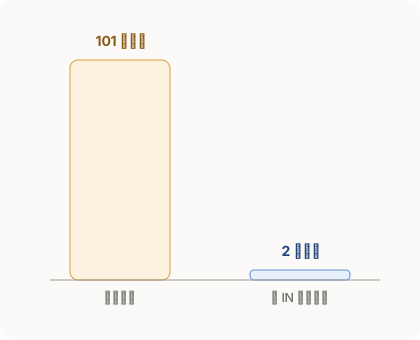
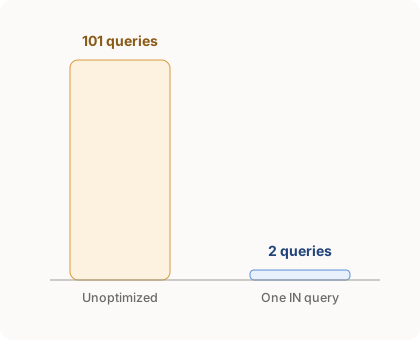
这段代码看起来很直觉:先拿订单,再一笔一笔拿每笔订单的商品。问题是,如果这个使用者有 100 笔订单,这段代码会对数据库发出 1 次查询(拿订单)加上 100 次查询(每笔订单各查一次商品),总共 101 次。这就是 N+1 查询问题的由来:N 笔记录,加上最初的 1 次查询。
The code looks intuitive: get the orders first, then get each order's items one by one. The problem is that if this user has 100 orders, the code makes 1 query (for the orders) plus 100 queries (one for each order's items), 101 in total. That is where the name N+1 comes from: N records, plus the initial 1 query.
demo 阶段可能只测 3 笔订单,感觉不出差别。正式环境使用者一多,这种写法会让数据库被大量重复的查询淹没,回应时间从几十毫秒拖到好几秒。
改法是一次把所有商品都拿出来,不要在迴圈里一笔一笔查:
At the demo stage you might test only 3 orders and feel no difference. In production, once users grow, this pattern floods the database with repeated queries, dragging response time from tens of milliseconds to several seconds.
The fix is to fetch all the items at once, rather than querying one by one inside the loop:
const orders = await db.execute("SELECT * FROM orders WHERE user_id = ?", [userId]);
const orderIds = orders.map(function(o) { return o.id; });
const allItems = await db.execute(
  "SELECT * FROM order_items WHERE order_id IN (?)",
  [orderIds]
);
// group allItems by order_id in code and put them back on the matching order
原本 101 次查询,变成 2 次。审查 AI 生成的代码时,看到迴圈里面藏着一次数据库查询,就要留意是不是这个问题。
101 queries become 2. When you review AI-generated code, if you see a database query hidden inside a loop, watch for this problem.
6.4 日志与监控:怎么知道东西坏了6.4 Logging and monitoring: how to know something broke
Demo 阶段东西坏了,你自己就在旁边看着,马上知道。正式环境东西坏了,没有人会主动通知你,你得靠日志(log)回头去查发生了什么事。
console.log 在开发阶段够用,正式环境通常需要把日志集中存起来,方便事后搜寻、设定"出现太多错误就通知我"这类警报。
同样重要的是,什么东西不该被记进日志:密码、信用卡卡号、API 金钥这类敏感资料,绝对不能出现在日志里。日志系统通常没有像数据库那样严格的存取控制,敏感资料一旦被记录下来,等于多开了一个外泄的破口。这个概念也算是这门课资安检查清单的延伸。
When something breaks at the demo stage, you are right there watching and know at once. When something breaks in production, no one tells you automatically, and you have to rely on logs to look back at what happened.
console.log is enough during development, but production usually needs logs collected centrally, so you can search them later and set alerts like "notify me if too many errors appear".
Just as important is what should not be logged: sensitive data like passwords, credit card numbers and API keys must never appear in logs. Logging systems usually do not have access control as strict as a database, so once sensitive data is logged, it opens another hole for leaks. This idea is an extension of the course's security checklist.
6.5 使用者体验的收尾细节6.5 The finishing touches of user experience
几个 demo 阶段容易被忽略、但直接影响使用者感受的细节:
- Loading 状态:使用者点击按钮后,画面要有反应,哪怕只是一个转圈圈的图示,不能让人误以为自己没点到
- 错误讯息要讲人话:不要把
Error: ECONNREFUSED这类系统层级的讯息直接丢给使用者看,要转成"系统忙碌,请稍后再试"这种看得懂的话 - 空状态:清单是空的时候,要显示"目前没有订单"这类提示,不能什么都不显示,让使用者以为是系统坏了
A few details easy to ignore at the demo stage that directly shape how users feel:
- Loading state: after the user clicks a button, the screen should respond, even with just a spinner, so they do not think their click did not register.
- Error messages in plain language: do not throw system-level messages like
Error: ECONNREFUSEDat the user, turn them into something understandable like "The system is busy, please try again later". - Empty state: when a list is empty, show a hint like "No orders yet", instead of showing nothing and making the user think the system is broken.
AI 给了你这段查询订单清单的代码:
AI gave you this code that queries the order list:
app.get('/api/orders', requireAuth, async function(req, res) {
  const orders = await db.execute("SELECT * FROM orders WHERE user_id = ?", [req.user.id]);
  for (const order of orders) {
    order.items = await db.execute("SELECT * FROM order_items WHERE order_id = ?", [order.id]);
  }
  res.json(orders);
});
这段代码在小规模测试时完全正常。给自己 2 分钟,想想如果这个使用者有几百笔订单会发生什么事,还有如果数据库中途断线会发生什么事,再往下看答案。
This code is perfectly fine in small tests. Give yourself 2 minutes to think about what happens if this user has hundreds of orders, and what happens if the database drops midway, then read the answer.
看答案
答案:两个问题。
第一,N+1 查询(对应 6.3):有几百笔订单,就是几百次额外的数据库查询,正式环境会明显变慢。
第二,没有错误处理(对应 6.2):整段代码没有 try/catch,数据库中途断线,或者任何一次查询失败,都会让这个请求直接当掉,使用者看到的会是一个不知所云的错误,而不是"系统忙碌,请稍后再试"这类看得懂的提示。
这两个问题都不会在 demo 阶段被发现,因为 demo 通常资料量小、环境稳定。审查代码时,除了看逻辑对不对,也要多问一句:"这段代码在资料量大、环境不稳定的时候,还会是这个样子吗?"
Answer: two problems.
First, an N+1 query (6.3): with hundreds of orders, that is hundreds of extra database queries, and production visibly slows down.
Second, no error handling (6.2): the code has no try/catch, so if the database drops midway or any query fails, the request crashes and the user sees a baffling error instead of an understandable message like "The system is busy, please try again later".
Neither problem shows up at the demo stage, because a demo usually has little data and a stable environment. When you review code, besides checking whether the logic is right, ask one more question: "Will this code still hold up when the data is large and the environment is shaky?"
延伸资源
- OWASP: Logging Cheat Sheet — 对应 6.4,日志该记什么、不该记什么的完整规范— for 6.4, the full spec on what to log and what not to log